What is Opensource AI?
A collection of technology & frameworks that is needed to use opensource AI to build systems & applications. e.g. build AI agent to book a flight OR shop for the right shoes at the right price point by comparing across multiple shopping websites.
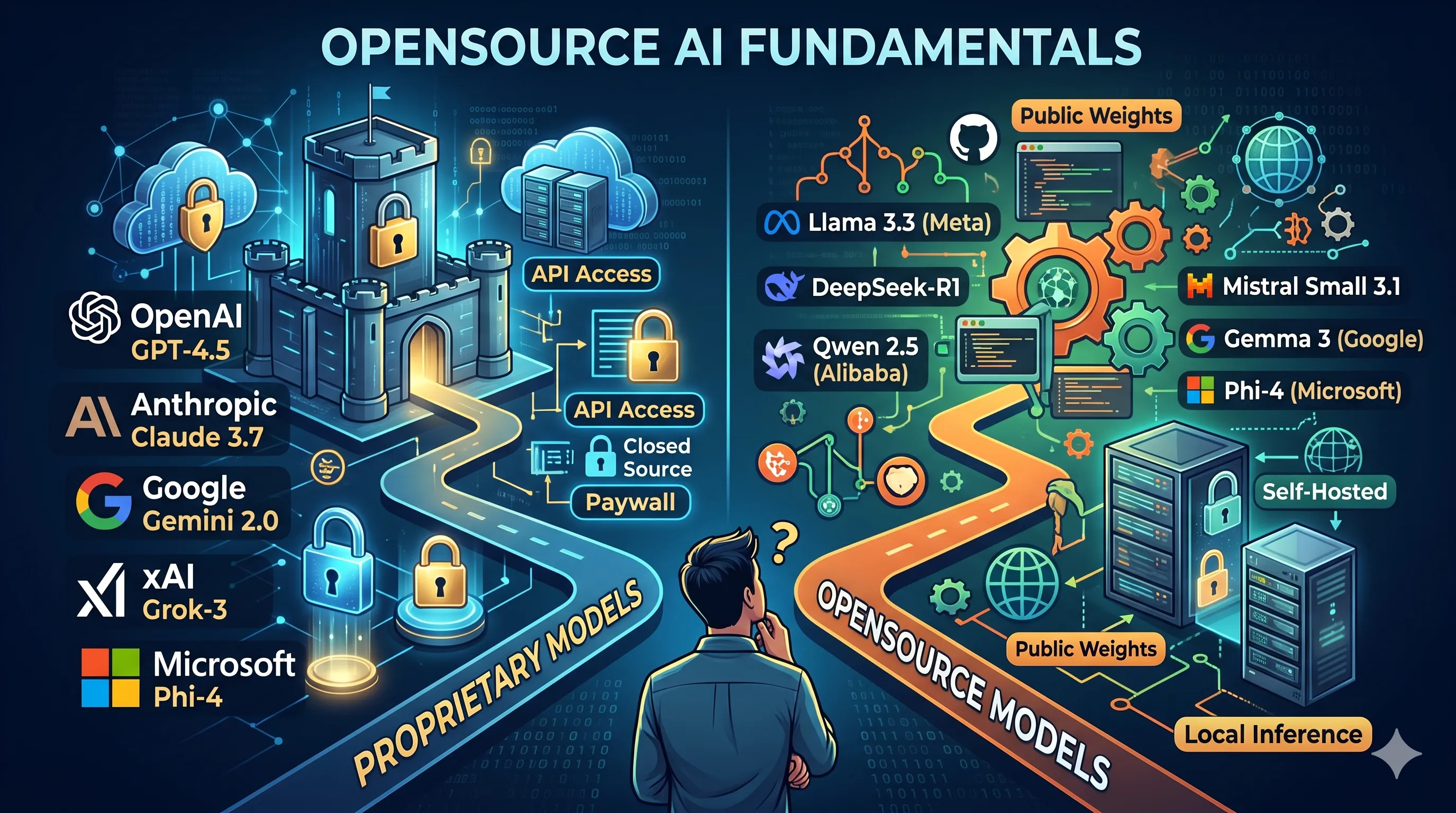
* AI Models - Proprietary vs Opensource Models
Choosing the right model is the foundation of any AI system. There are two categories:
Proprietary Models — Closed-source, API-access only, typically more capable out-of-the-box:
- OpenAI GPT-4.5, o3, o3-mini, o1
- Anthropic Claude 3.7 Sonnet (with extended thinking), Claude 3.5 Haiku
- Google Gemini 2.0 Flash, Gemini 2.0 Pro (Experimental)
- xAI Grok-3, Grok-3 mini
- Microsoft Phi-4 (via Azure AI Foundry)
Opensource Models — Weights available publicly, can be run locally or self-hosted:
- Llama 3.3 (70B) from Meta — Latest flagship open model, best-in-class instruction following
- DeepSeek-R1 / DeepSeek-V3 — Top-tier reasoning & coding, rivals GPT-4o at 1/10th cost
- Qwen 2.5 / Qwen2.5-Coder (7B, 32B, 72B) from Alibaba — Excellent coding & multilingual
- Qwen3-VL (2B, 7B) — Multimodal (vision + language), great for image understanding tasks
- Mistral Small 3.1 (24B) — Fast, efficient, Apache 2.0 licensed, strong instruction following
- Gemma 3 (1B, 4B, 12B, 27B) from Google — Lightweight, optimized for local inference
- Phi-4 (14B) from Microsoft — Punches above its weight on reasoning benchmarks
- GLM-4 from Zhipu AI — Strong multilingual support, especially Chinese + English
- Kimi k1.5 from Moonshot AI — Long-context reasoning model (up to 128k tokens)
* Model Ranking Leaderboard
Before picking a model, consult benchmarks and community rankings to find the best fit for your use case (coding, reasoning, instruction-following, multilingual, etc.):
- llm-stats.com — Aggregated benchmarks and cost comparison
- OpenRouter Rankings — Real-world usage and popularity rankings across providers
- HuggingFace Open LLM Leaderboard — Standardized evals (MMLU, HellaSwag, ARC, etc.)
Key benchmarks to look at:
- MMLU — General knowledge across 57 subjects
- HumanEval / MBPP — Coding ability
- MT-Bench — Multi-turn conversation quality
- MATH / GSM8K — Mathematical reasoning
* Model Manager — Ollama & Docker Desktop Models
To run and manage open-source models locally, you need a model manager:
-
Easiest way to download, run, and switch between local LLMs
-
Single command to pull and run:
ollama run llama3 -
REST API at
http://localhost:11434— compatible with OpenAI API format -
Supports: Llama 3, Mistral, Gemma, Phi, Qwen, DeepSeek, and more
-
Cross-platform: macOS, Linux, Windows
Docker Desktop Models
- Docker Desktop (4.40+) has a built-in AI model runner
- Pull and run models as containers:
docker model run ai/llama3.2
~ » docker model list
MODEL NAME  PARAMETERS  QUANTIZATION   ARCHITECTURE  MODEL ID      CREATED       CONTEXT  SIZE
gemma3 3.88 B MOSTLY_Q4_K_M gemma3 a353a8898c9d 5 months ago 2.31 GiB- Exposes OpenAI-compatible API endpoint locally
(base) ~/ curl http://localhost:12434/v1/models
{"object":"list","data":[{"id":"docker.io/ai/gemma3:latest","object":"model","created":1758368217,"owned_by":"docker"}]}
(base) ~/ curl http://localhost:12434/v1/chat/completions \
-H "Content-Type: application/json" \
-d '{
"model": "ai/gemma3",
"messages": [{"role": "user", "content": "who are you"}]
}'
{"choices":[{"finish_reason":"stop","index":0,"message":{"role":"assistant","content":"I'm Gemma, a large language model created by the Gemma team at Google DeepMind. I'm an open-weights model, which means I’m widely available for public use! \n\nI can take text and images as inputs and respond with text. \n\nIt’s nice to meet you!"}}],"created":1775723162,"model":"model.gguf","system_fingerprint":"b1-0988acc","object":"chat.completion","usage":{"completion_tokens":65,"prompt_tokens":12,"total_tokens":77,"prompt_tokens_details":{"cached_tokens":0}},"id":"chatcmpl-0urCVAwxCjdfxOEOJ0fo2uNR987Am3Em","timings":{"cache_n":0,"prompt_n":12,"prompt_ms":124.101,"prompt_per_token_ms":10.34175,"prompt_per_second":96.69543355815023,"predicted_n":65,"predicted_ms":1414.579,"predicted_per_token_ms":21.762753846153846,"predicted_per_second":45.9500671224442}}%- Useful if your stack is already containerized
* Running a Local Model
Steps to get a model running locally:
- Install Ollama: Download from ollama.com and install
- Pull a model:
ollama pull qwen3-vl:2borollama pull deepseek-coder-v2:latest
~ » ollama list
NAME                        ID              SIZE      MODIFIED
deepseek-coder-v2:latest    63fb193b3a9b    8.9 GB    45 hours ago
qwen3-vl:2b                 0635d9d857d4    1.9 GB    3 days ago
qwen2.5-coder:7b dae161e27b0e 4.7 GB 12 days ago- Run the model interactively:
ollama run qwen3-vl:2b - Use via API:
curl http://localhost:11434/api/generate \ -d '{"model": "qwen3-vl:2b", "prompt": "Explain RAG in simple terms"}' - Persist context using chat API for multi-turn conversations
- Monitor performance: Check RAM/VRAM usage — most 7B models need ~8GB RAM; 13B needs ~16GB
Tips:
- Use quantized models (e.g., Q4_K_M) for lower memory footprint with minimal quality loss
- GPU acceleration is automatic on Apple Silicon (Metal) and CUDA (NVIDIA)
* Building AI Agents — No-Code: Ollama + n8n
For no-code / low-code AI agent building:
n8n is an open-source workflow automation tool similar to Zapier/Make, but self-hostable and AI-native.
Architecture:
User Input → n8n Workflow → Ollama (local LLM) → Tool Calls → ResponseSteps:
- Self-host n8n via Docker:
docker run -it --rm -p 5678:5678 n8nio/n8n - Add an AI Agent node in n8n
- Connect it to Ollama Chat Model node (point to
http://localhost:11434) - Add Tool nodes (e.g., HTTP Request, Google Search, Database query)
- Define a system prompt and let the agent autonomously call tools
Use cases:
- Auto-research and summarize news
- Book flights by scraping airline sites
- Price comparison across shopping websites
- Email triage and auto-reply